
A plumber in Henderson emails a bathroom quote on Tuesday morning. By Friday he has heard nothing back, so he rings to chase it. The customer is apologetic: the quote had been sitting in the junk folder since Tuesday. Emails going to spam cost that business four days and nearly cost it the job as well.
Nothing was wrong with the message itself. The problem sat in DNS, because receiving mail servers no longer take a sender’s word for anything. Gmail, Outlook and the other large providers now check whether a message truly came from the domain it claims. If your domain cannot prove that, your mail gets filtered or quietly discarded. Three DNS records do the proving, and most small Kiwi businesses have only one of them set up properly. That gap is the single most common reason for emails going to spam.
Why emails going to spam is usually a DNS problem
Email was designed in a more trusting era. The protocol lets anyone type any address into the From field, so a scammer can send as you without ever touching your mailbox or your password. Filters had to compensate for that. Today a receiving server weighs your domain’s authentication records first and your subject line second.
That order matters for a small business. Your wording is usually fine. Your identity is what fails. So before you rewrite a newsletter or strip out every link, check whether your domain can prove who it is. Emails going to spam almost always trace back to that one question. Three DNS records handle that job, and they work in sequence.
SPF lists the servers allowed to send for you
SPF is a single TXT record on your domain. It names every server that may send mail as you, and it looks something like this:
v=spf1 +mx +a include:_spf.google.com -all
When a message arrives, the receiving server compares the connecting server’s address against that list. The -all on the end means anything not on the list should fail. Two mistakes cause most SPF problems. First, people forget the services that send on their behalf, such as Xero invoices, a Mailchimp campaign, a booking system or the contact form on the website. Second, a domain ends up with two SPF records, which is not allowed, so both are ignored. Either mistake is enough to start your emails going to spam.
There is also a limit of ten DNS lookups per record. Stack up enough include: entries and the check fails on a technicality, even though every sender is legitimate.
DKIM signs each message so it cannot be altered
DKIM adds a cryptographic signature to every message you send. Your mail server holds the private key, while the matching public key sits in DNS at a selector such as default._domainkey.yourbusiness.co.nz. The receiver fetches that key, checks the signature and learns two things: the message really came from your domain, and nobody edited it along the way.
DKIM also survives forwarding, where SPF often does not. Say a customer forwards your quote to their business partner. The SPF check now fails, because the forwarding server was never on your list. Your DKIM signature still validates, so the message keeps its good standing. That alone rescues a lot of forwarded emails going to spam. In cPanel, the Email Deliverability tool generates the key pair and publishes the record for you when your DNS is hosted with us.
DMARC sets the rule when a check fails
SPF and DKIM only report a result. Neither one says what a receiver should do about a failure, and that is DMARC’s job. It is a TXT record at _dmarc.yourbusiness.co.nz:
v=DMARC1; p=none; rua=mailto:dmarc@yourbusiness.co.nz
DMARC adds alignment, which is the part people miss. The domain a reader sees in the From field must match the domain that passed SPF or signed with DKIM. Without alignment, a spammer could pass SPF for their own domain while still showing your name.
The p= value is the instruction. Use none to watch without blocking, quarantine to send failures to junk, or reject to refuse them outright. Start at none for a few weeks and read the reports that rua collects. Once you can see every legitimate sender passing, tighten the policy. Jumping straight to reject is how businesses accidentally block their own invoices. Handled in that order, DMARC is the biggest single fix for emails going to spam.
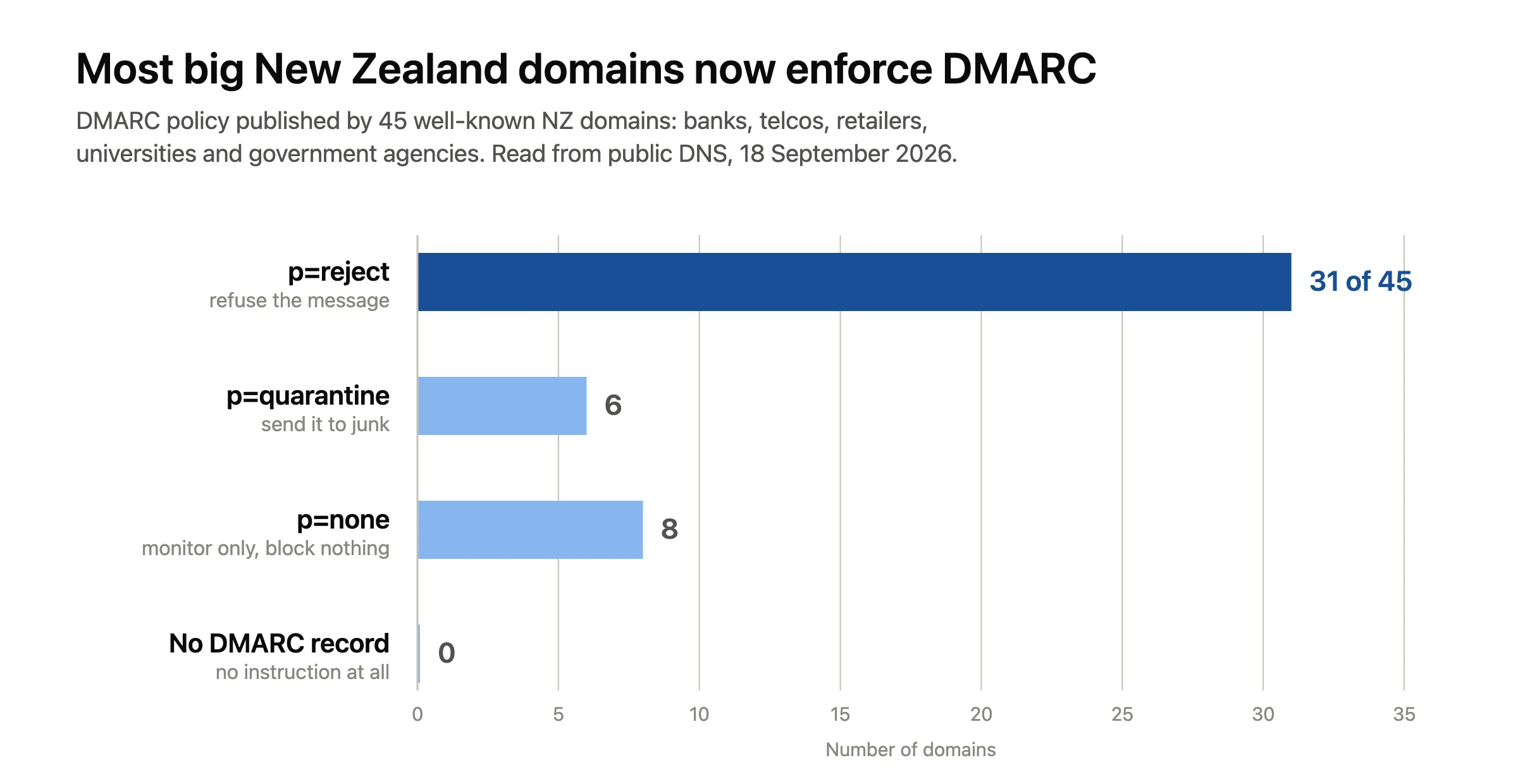
DMARC policy published by 45 well-known New Zealand domains, read from public DNS on 18 September 2026.
What the big New Zealand domains already publish
We looked up the public records of 45 well-known New Zealand domains in September 2026, covering banks, telcos, retailers, universities and government agencies. Every one of them publishes SPF. Every one publishes DMARC too. Thirty-one sit at p=reject, six at p=quarantine and eight at p=none.
These are large organisations with staff dedicated to the job, so this is not a fair comparison with a two-person business in Tauranga. Still, it shows the baseline that mailbox providers see all day. Against that background, a domain publishing nothing at all stands out for the wrong reason, and it sees far more of its emails going to spam. Notice the eight at p=none as well, because publishing a DMARC record and enforcing it are different things.
Check your own records in about five minutes
If your emails are going to spam, start here instead of guessing. You do not need a tool subscription to find out where you stand, so work through this once:
- Send a message from your business address to a Gmail account you control.
- Open it there, click the three dots and choose Show original.
- Read the three lines at the top. SPF, DKIM and DMARC should each say PASS.
- If DKIM says none rather than fail, no signature exists yet, so it has never been set up.
- In cPanel, open Email Deliverability and check for a green tick beside your domain.
- List every other system that emails your customers, then confirm each one appears in your SPF record.
That last step catches more problems than the rest put together. Google publishes its own requirements for senders, and Microsoft applies similar rules, so passing for Gmail usually means passing for Outlook.
Sending habits that keep emails going to spam
Authentication fixes identity, though it cannot fix behaviour. These habits still send perfectly good emails going to spam:
- Sending a 400-person newsletter from your normal mailbox instead of a mailing platform.
- Emailing a list you bought or scraped, rather than one people joined.
- Leaving out an unsubscribe link on anything that looks like marketing.
- Sending from a free Gmail address while signing off as your company.
- Writing subject lines in capitals, or padding them with exclamation marks.
- Linking to a shortened URL, since filters cannot see where it goes.
Use your domain for real correspondence and a proper platform for bulk sending. Our guide to creating an email account in cPanel covers the setup, and connecting that mailbox to Outlook takes another few minutes.
When the records are right and mail still lands in junk
Reputation takes a little while to recover. After you publish SPF and DKIM, give it two or three weeks of normal sending before judging the result. Meanwhile, ask a few regular customers to open your message, mark it as not spam and add you to their contacts. That teaches the filter faster than anything you can do at your end.
Check your website’s DNS at the same time, because a broken record often sits next to a stale one. Our walkthrough on modifying DNS records in cPanel shows where each entry lives, and our plain-English DNS guide explains why changes take time to spread.
Questions we get about emails going to spam
How long do DNS changes take to work?
Usually somewhere between a few minutes and a few hours, depending on the TTL on the old record. Test with Show original again the next morning rather than sending twenty test messages in a row.
Will DMARC stop emails going to spam for good?
No, but it removes the most common cause of emails going to spam. DMARC proves your identity, though filters still weigh your sending history and the content of the message. Think of it as clearing the first hurdle properly.
Do I still need these records with Microsoft 365?
Yes. Microsoft and Google sign outbound mail for their own infrastructure, yet your custom domain still needs its own SPF, DKIM and DMARC entries. Both providers give you the exact values to paste into DNS.
Need a hand?
If DNS is not how you want to spend a Saturday, send us the domain and we will check all three records for you. We will tell you plainly which one is missing and what it should say. Our servers sit here in New Zealand, support runs around the clock, and we handle website and email migrations at no charge for new customers. Either contact our support team or have a look at our NZ hosting plans. Curious what our customers say? Have a look at our Trustpilot reviews.