
Picture two quotes arriving in a customer's inbox on the same morning. One comes from a free Gmail address made up of a nickname and a birth year. The other comes from joe@yourbusiness.co.nz. Both tradies might be equally good at the job, but only one of them looks like an established business before the email is even opened.
A business email address is one of the cheapest upgrades a small business can make, and one of the most often put off. This guide covers what it is, what it costs in New Zealand, how to set one up in an afternoon, and how to move off your old address without losing mail.
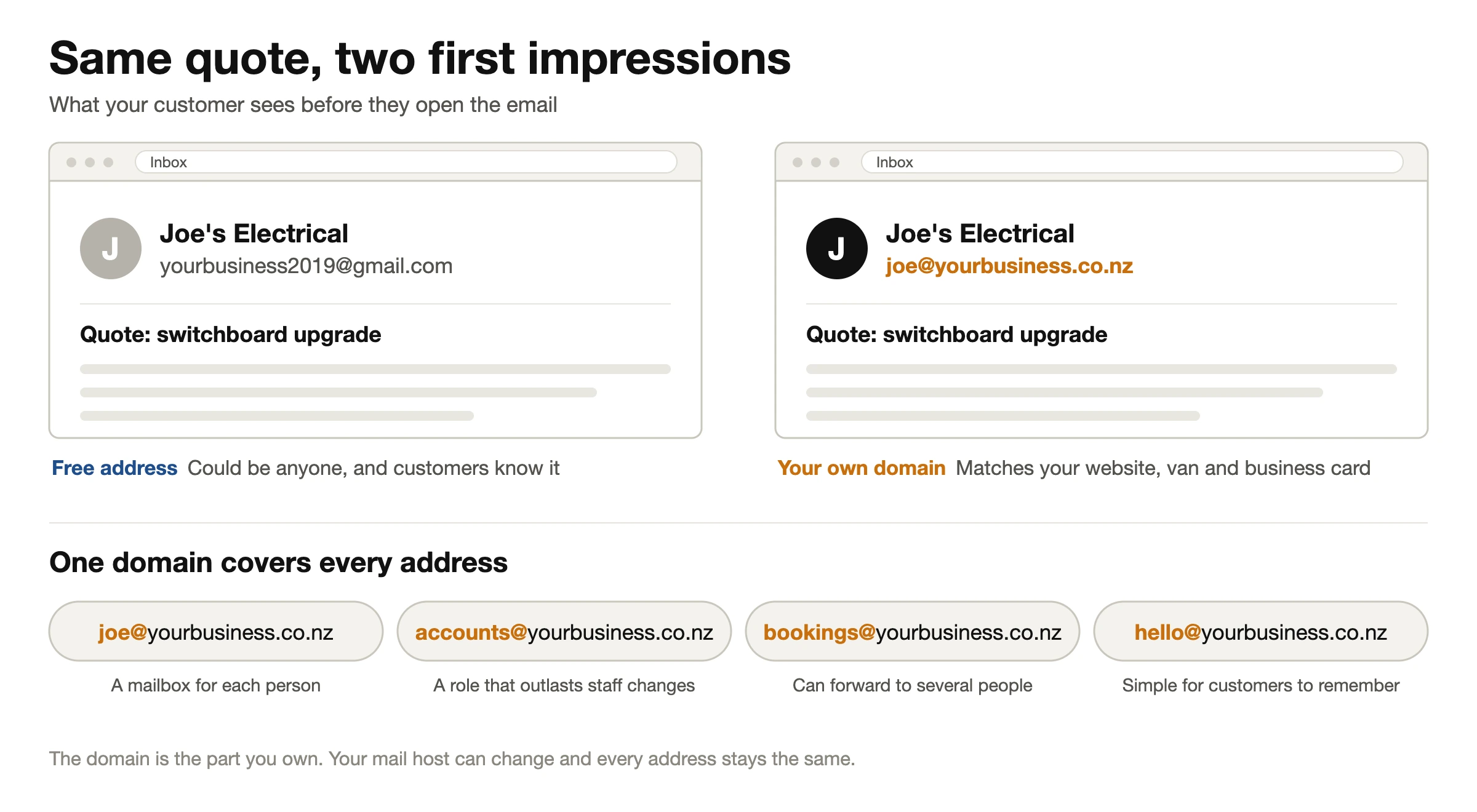
The same quote from a free address and from an address on your own domain, and how one domain covers every address you need.
What is a business email address?
A business email address is an address that ends in your own domain name, such as hello@yourbusiness.co.nz, instead of a free provider's name like gmail.com, xtra.co.nz or outlook.com. You need two things to have one: a domain name you control, and a mail service that hosts the mailboxes for that domain.
The domain is the part that matters most. Whoever controls the domain controls every address on it, so it should be registered in the business owner's name, not a web designer's or a former staff member's. If you have not picked one yet, our guide to choosing between .nz, .co.nz and .com will help.
Why a free Gmail or Xtra address holds your business back
It looks temporary
Customers are told, rightly, to be wary of invoices and payment requests from free email accounts, because that is what most invoice scams use. An address on your own domain matches your website, your van and your business card. It tells people who they are dealing with before they read a word.
You do not control it
A free mailbox runs on the provider's terms, and those terms change. Spark now describes Xtra Mail as a service designed for personal use and points business users elsewhere. Google changed the rules too. Since January 2026, Gmail on the web no longer collects mail from other accounts over POP. That broke a setup many small businesses relied on to read their domain mail inside a free Gmail inbox.
When the address sits on your own domain, the provider becomes replaceable. You can move your mail to a different host next year and every customer still reaches you at the same address.
It leaves when your staff do
If a staff member deals with customers from a personal address, those conversations go with them when they move on. With addresses on your domain, you reset the password or forward the mailbox to someone else, and nothing is lost.
It limits your marketing
Newsletter, booking and invoicing tools expect you to send from a domain you can verify. Gmail and Yahoo have required bulk senders to authenticate their mail with SPF, DKIM and DMARC since early 2024, and you can only publish those records on a domain you own.
What a business email address costs in New Zealand
With us, a business email address is not a separate product. Email on your own domain is included in every HostMidas hosting plan, on the same bill as your website.
| Plan | Price (NZD) | Mailboxes | Websites | SSD storage |
|---|---|---|---|---|
| Kiwi Starter | $10 a month | 5 | 1 | 10GB |
| Kiwi Pro | $15 a month | 25 | Up to 5 | 50GB |
| Kiwi Plus | $25 a month | 100 | Up to 10 | 100GB |
| Kiwi Premium | $30 a month | Unlimited | Unlimited | 200GB |
The price is for the plan, not per person, so adding a second or third mailbox does not change your bill. Mail is stored in the same disk space as your website, and a fair usage policy applies to unlimited plans.
The only other cost is the domain name itself. A .nz or .co.nz domain is about $40 a year on our domains page, and yearly hosting plans include a free domain for the first year.
It is worth being clear about what this is. Hosting email covers the essentials: sending and receiving on your own domain, from your phone, your computer or webmail, with forwarders for shared addresses. It is not a full office suite. If your team needs shared calendars, video meetings or very large mailboxes, a dedicated office suite is the better fit, and you can still host your website with us and point your mail there.
How to set up a business email address in six steps
Set aside an afternoon. These six steps take you from no domain at all to a tested, working address.
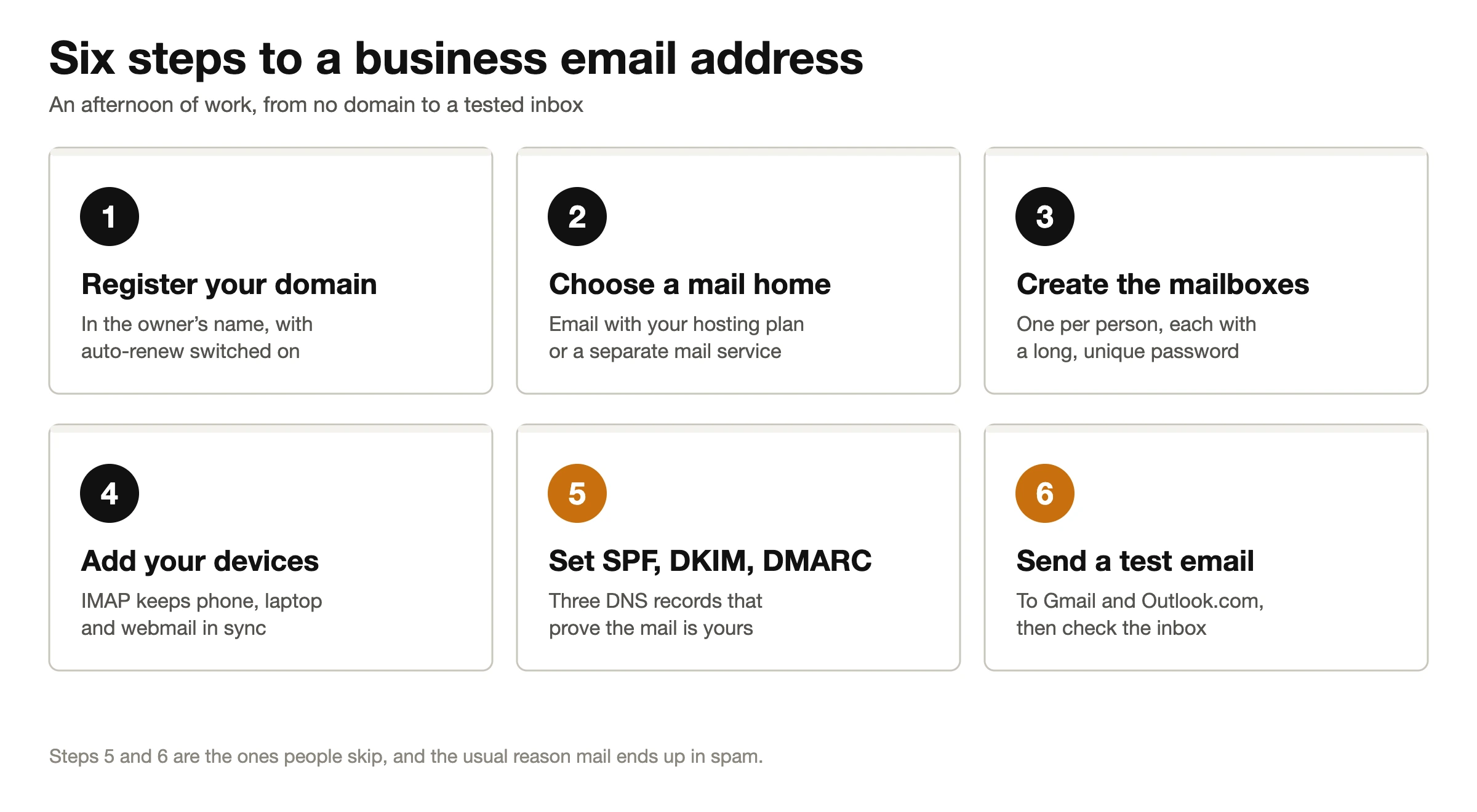
The six steps at a glance.
1. Register your domain
Search for your name on our domains page. Shorter is better, and it should be easy to say over the phone. Register it in the business owner's name, with a contact email you will still have in five years.
2. Decide where the mailboxes will live
For most sole traders and small teams, the email included with a hosting plan is all you need. Our Kiwi Starter plan includes 5 mailboxes and Kiwi Pro includes 25.
3. Create your mailboxes
In cPanel, open Email Accounts, choose the address and set a long, unique password. It takes about a minute per mailbox. Our walkthrough on creating an email account in cPanel covers each step.
4. Add the account to your phone and computer
Set the account up as IMAP so your phone, laptop and webmail all show the same folders. We have guides for Outlook and Mac Mail, and the mail apps on your phone accept the same settings. You can also log in to webmail from any browser.
5. Check SPF, DKIM and DMARC
These three DNS records prove your mail really comes from you, and they are the main reason mail does or does not reach the inbox. In cPanel, the Email Deliverability tool shows whether SPF and DKIM are in place. Our guide on why business emails go to spam explains all three and how to add DMARC.
6. Send a test
Email a Gmail address and an Outlook.com address and check that both land in the inbox. In Gmail, open the message menu and choose Show original. You want to see PASS beside SPF, DKIM and DMARC.
Which addresses to create
Give each person a named address, such as sarah@yourbusiness.co.nz, and use role addresses for jobs that outlast any one person, such as accounts@, bookings@ or hello@. Role addresses work well as forwarders. A forwarder passes mail on to one or more people, costs nothing extra and does not use up a mailbox.
Avoid one shared mailbox with a password that five people know. You cannot tell who sent what, and you have to change the password every time someone leaves.
Moving from your old address without losing mail
You do not have to switch overnight. Run both addresses side by side for a while and move people across gradually.
- Keep the old address open for 6 to 12 months. Do not close it the day the new one works.
- Forward the old address to the new one. Most providers, Gmail included, have a forwarding setting.
- Add an auto-reply on the old address that gives the new one.
- Reply from the new address every time, so your contacts save it without being asked.
- Update everywhere the old address is published: your website and contact forms, Google Business Profile, social media pages, invoice and quote templates, your email signature, and your records with the bank, IRD and the NZBN register.
- Bring old mail across if you need it. With both accounts added to the same mail app over IMAP, you can drag folders from one to the other.
If your email is already on your own domain but with another host, the address stays the same and only the mailboxes move. We migrate websites and email accounts for free, and our guide to moving host without downtime explains the order we do it in.
Mistakes we see with business email
- The domain is in someone else's name. If your web designer or a past employee registered it, ask for it to be transferred to you now, while everyone is still on good terms.
- Renewal notices go to an address on the same domain. If the domain lapses, your email stops, and so do the reminders telling you to renew. Turn on auto-renew and add a second contact address.
- No DMARC record. Without one, receiving mail servers have no instruction to reject messages that fake your domain.
- Newsletters sent from the mailbox. A mailbox is for one-to-one mail. For bulk mail, use a newsletter service. Shared hosting mailboxes, ours included, are not built or permitted for mass mailing.
Business email address: questions we get asked
Can I have a business email address without a website?
Yes. You need a domain and a mail service, nothing more. Plenty of businesses start with email and add the website later. With a hosting plan, the space for the site is already there when you are ready.
Can I keep using the Gmail app or Outlook?
Yes. Add the new address as an IMAP account in the Gmail app on your phone, in Outlook or in Apple Mail. What no longer works is asking the Gmail website to collect the mail for you over POP.
How many addresses do I need?
Start with one mailbox per person, plus one or two role addresses set up as forwarders. It is easy to add more later.
What happens to my email if I change web host?
Your addresses stay exactly the same, because they belong to the domain and not the host. The mailboxes themselves need to be copied to the new host before the DNS is switched, so nothing goes missing in between.
Is .co.nz or .nz better for email?
Technically they work the same. Choose the one that is easiest to say aloud and spell over the phone, because that is how most email addresses get passed on.
Need a hand?
Every HostMidas NZ hosting plan includes email on your own domain, free SSL, daily backups and servers in New Zealand, from $10 a month. Yearly plans come with a free domain for the first year, so you get a business email address and a home for your website on one plan. Questions first? Send our support team a message and we will point you in the right direction.