
A Wellington café owner rang us at 7.40 on a Monday morning. Her website is down, the online ordering page shows nothing at all, and the breakfast rush starts in twenty minutes. She had already tried the thing everyone tries first, which is reloading the page about thirty times. That almost never helps. What does help is ruling out the possibilities in order. The fix for an expired domain looks nothing like the fix for a plugin that crashed overnight.
A website is down for one of five reasons. You can rule out three of them from your phone in under five minutes. The order below is the one our support team works through. Start at the top and stop as soon as something looks wrong. You will usually find the cause before you need to ring anybody.
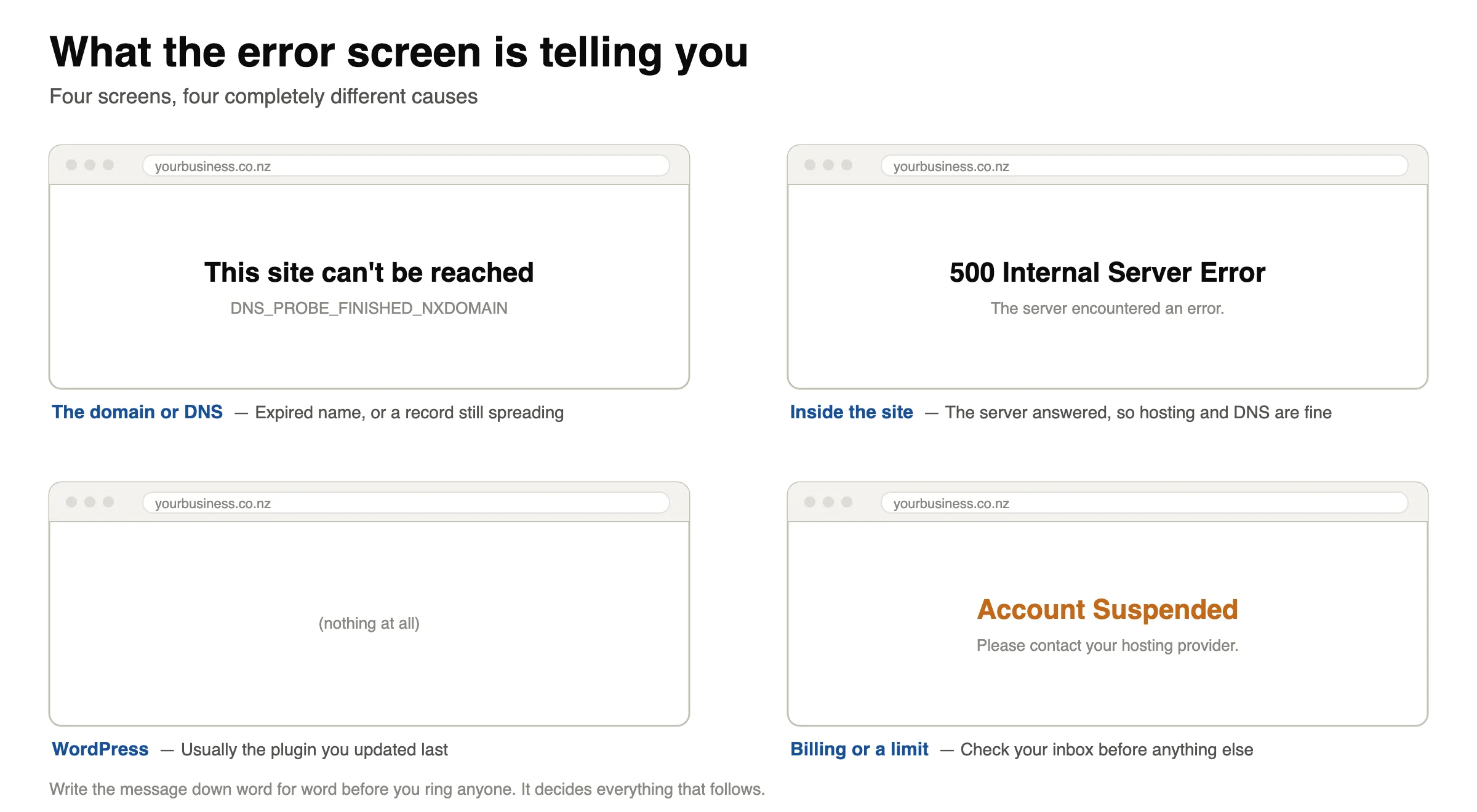
The four screens you are most likely to see, and what each one is telling you.
First, check whether your website is down for everyone
Half the panicked calls we take turn out to be one computer, one browser or one office network. So before anything else, switch your phone off wi-fi and load the site on mobile data. If it appears, your website is down only for you. The fault sits on your own machine or your own connection.
Two more quick checks are worth doing. Open the site in a private window, which sidesteps a stale cache and any browser extension misbehaving. Then try one of the public "is it down" checkers. They load your address from a server somewhere else and report what they see. None of this fixes anything. Still, it takes ninety seconds, and it stops you chasing a fault that was never there. Confirm your website is down for everyone before you go any further.
The five reasons a website is down
Nearly every outage we see is one of these, roughly in order of how often they turn up:
- The domain expired. Renewal notices go to an old email address, nobody opens them, and the name simply stops resolving.
- A DNS record changed. Someone edited a record, or a nameserver change is still spreading across the internet.
- The hosting account is suspended or over a limit. An unpaid invoice will do it, and so will a sudden burst of traffic.
- The server is struggling. Uncommon, but real. You normally get a 500 or 502 error rather than nothing at all.
- WordPress broke. A plugin update, a theme change, or a hack. The site answers, then shows an error or a blank white page.
The message on screen narrows things down fast. Take "This site can't be reached", or a warning that the server address could not be found. Both point straight at the domain or DNS. A 500 or 503 means the server did answer. So the name and the hosting are both fine, and the fault is inside the site itself. Mozilla keeps a plain list of HTTP status codes if you want to look yours up.
Start with the domain and DNS
An expired domain is the most common reason a website is down, and the easiest to confirm. Look your name up in a public whois search and read the expiry date. If it has passed, renewing usually brings the site back within the hour. A name left lapsed for weeks takes longer to recover, and can cost more.
If the domain is current, look at where it points. A record edited last week can take a day or two to settle everywhere. That is why a site can load for you and fail for a customer in Christchurch. Our guide on what DNS actually does explains the moving parts. The walkthrough on modifying DNS records in cPanel shows you where to look. Nameserver changes are the slowest of the lot, so if you moved host recently, suspect that first.
When the server is the problem
Server faults feel like the obvious explanation, yet they are the least likely one. They do happen though. Check your email before anything else, because a suspended account always comes with a notice in your inbox. Then try loading your control panel. If cPanel opens but your site does not, the machine is clearly alive. The problem is narrower than you feared.
Shared hosting carries limits too, and a traffic spike or a runaway process can hit them. You might see a 508 error, or pages that crawl and then time out. Usually that passes on its own. If it keeps recurring, the account has outgrown its plan. Stepping up a tier costs far less than the orders you lose every time your website is down.
When WordPress is the problem
When your website is down with a white page or a fatal error, the site is still answering. So the hosting is fine. Nine times in ten a plugin update caused it. If you can still reach wp-admin, deactivate whichever plugin updated last and reload. If you cannot get in at all, rename that plugin's folder in the cPanel file manager. That switches it off without touching anything else.
A hacked site behaves differently. You might get redirected somewhere unpleasant, or find pages you never wrote. Do not try to clean it by hand while it is live. Restore the most recent clean backup instead, then work out how they got in. Restoring without closing the hole only buys you a few days. Every account here includes JetBackup 5, and restoring a backup takes about ten minutes. Our notes on keeping WordPress locked down cover what to tighten afterwards.
What to tell customers while your website is down
This part gets forgotten, and it usually costs more than the outage itself. Your social accounts and your email still work while your website is down, so use them. A short post saying the site is having trouble stops people assuming you have shut up shop. Give a phone number and a rough estimate.
Keep that estimate honest. "Back later today" lands better than "back in ten minutes" posted four times in a row. If you sell online, say plainly how someone can buy in the meantime. Customers forgive an outage easily enough. They remember being ignored.
A checklist to work through
Print this one, or keep it in your phone notes. Work through it the moment your website is down. End to end it takes about ten minutes.
- Load the site on mobile data with wi-fi off, then again in a private browser window.
- Write down the exact error message, word for word. It decides everything after this.
- Check the domain expiry date on a whois lookup.
- Search your inbox for a suspension or billing notice from your host.
- Open your control panel. If it loads, the server is running.
- If wp-admin still works, deactivate the plugin you updated most recently.
- If none of that explains it, ring your host with the error message in front of you.
That last step goes quicker than people expect. Tell support exactly what you see. Something like "I get a 502 on the home page, the domain renews in March, and cPanel opens fine". That one sentence saves twenty minutes.
Website is down: questions we get asked
How do I know if my website is down for everyone?
Load it on mobile data with wi-fi switched off, then try a checker that reaches your address from another network. If both show the site, the fault is local to you. Clearing the browser cache or restarting your router sorts out most of those.
How long should a fix take?
How long your website is down depends entirely on the cause. Rolling back a plugin or restoring a backup takes minutes. A renewed domain normally comes back inside an hour. A nameserver change can take a full day to settle everywhere. That is why we move sites across before switching DNS rather than after.
Can I stop this happening again?
Mostly, yes. Put renewals on auto-renew against an email address you actually read. Keep a backup you have tested, and update plugins one at a time instead of all at once. Uptime monitoring helps as well, so you hear about an outage before a customer rings to tell you.
Need a hand?
If you are stuck, our support team runs 24/7 and will check the server side with you. If you are weighing up a move, our NZ hosting keeps sites, email and backups on servers here. Migrations are free. The knowledge base has step-by-step guides for most of the checks above. You can also read what our customers say about us on Trustpilot.